
Qwen Image poster prompts: visuals and short titles
Make a poster draft with Qwen Image. Compare requested words with a real output, check unwanted fine print, and know when to add editable text separately.
Last updated: 2026-10-15
Use Qwen for the visual and a short heading
Qwen can help draft a poster composition with a visual subject and a short title. If your poster needs long paragraphs, guaranteed spelling, exact brand lettering or repeated wording changes, generate the artwork and add text in a design editor. A downloaded PNG is a flattened bitmap, not an editable poster template with separate text layers.
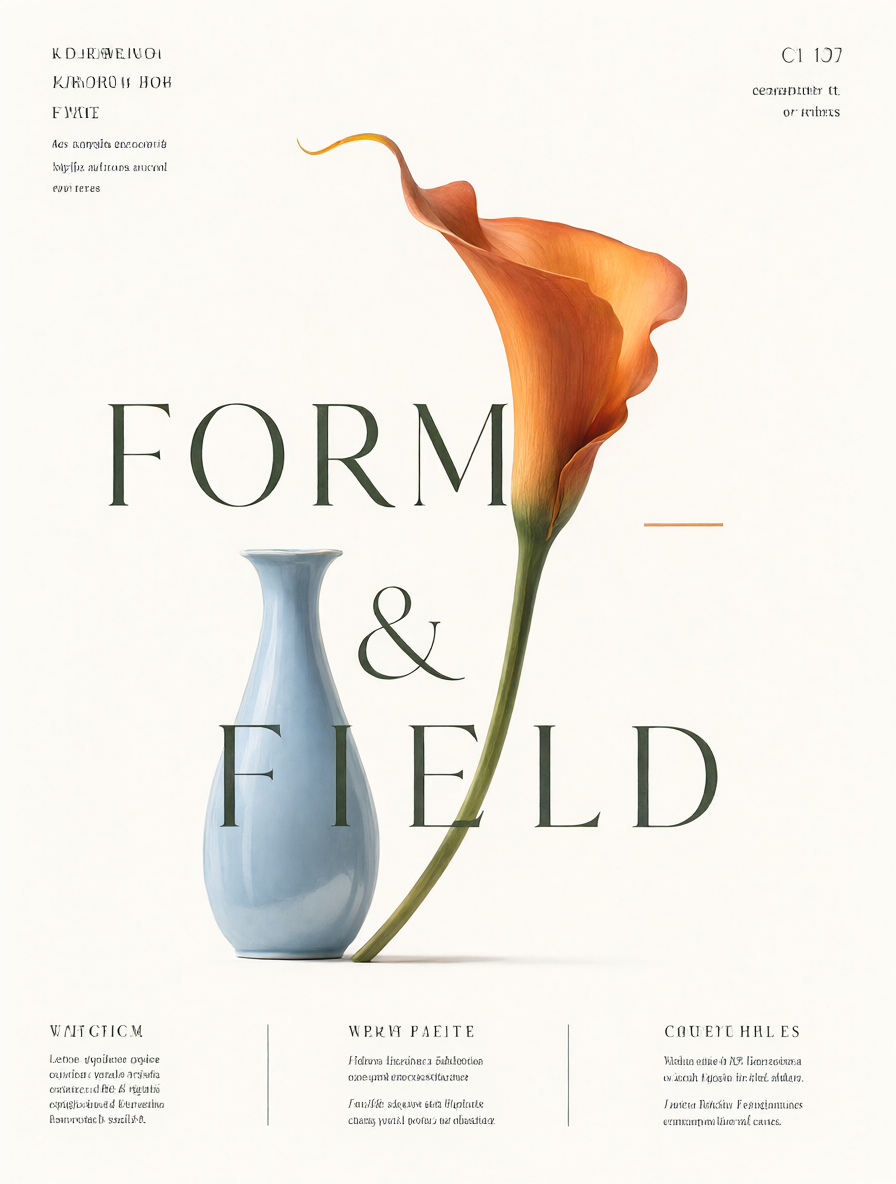
Our example below has a legible main heading and unwanted, garbled small print. It is useful as a design draft, not a finished advertisement. This single result does not establish which model is best or how often text will be correct.
Before you generate
Prepare one subject, one short heading and the intended aspect ratio. Put required visible wording in quotation marks. Set aside a small attempt budget and decide which text you will add yourself. Generation requires Google sign-in and paid credits; you can inspect and download the existing example without signing in.
Build a first draft in four steps
- Select Create image and Qwen Image 2.1 in the workspace. For this example, choose 1K, 3:4, PNG, and turn Transparent background off. Under Advanced settings, turn Enhance prompt off.
- Name the output and subject: an editorial poster with an orange flower and a blue vase.
- Specify the exact short heading, composition and empty space. Add material and lighting details only when they matter to the result.
- Check the credit cost, generate and download the original. Review every character at full size before publishing.
Tested prompt and actual output
This site-generated example used the settings above on October 15, 2026. Repeating the prompt will not necessarily reproduce the same image.
A refined editorial poster for a fictional botanical studio, large dark forest green typography reading "FORM & FIELD", one sculptural orange calla lily and a pale blue ceramic vase, off-white paper, generous negative space, sophisticated graphic design, readable text
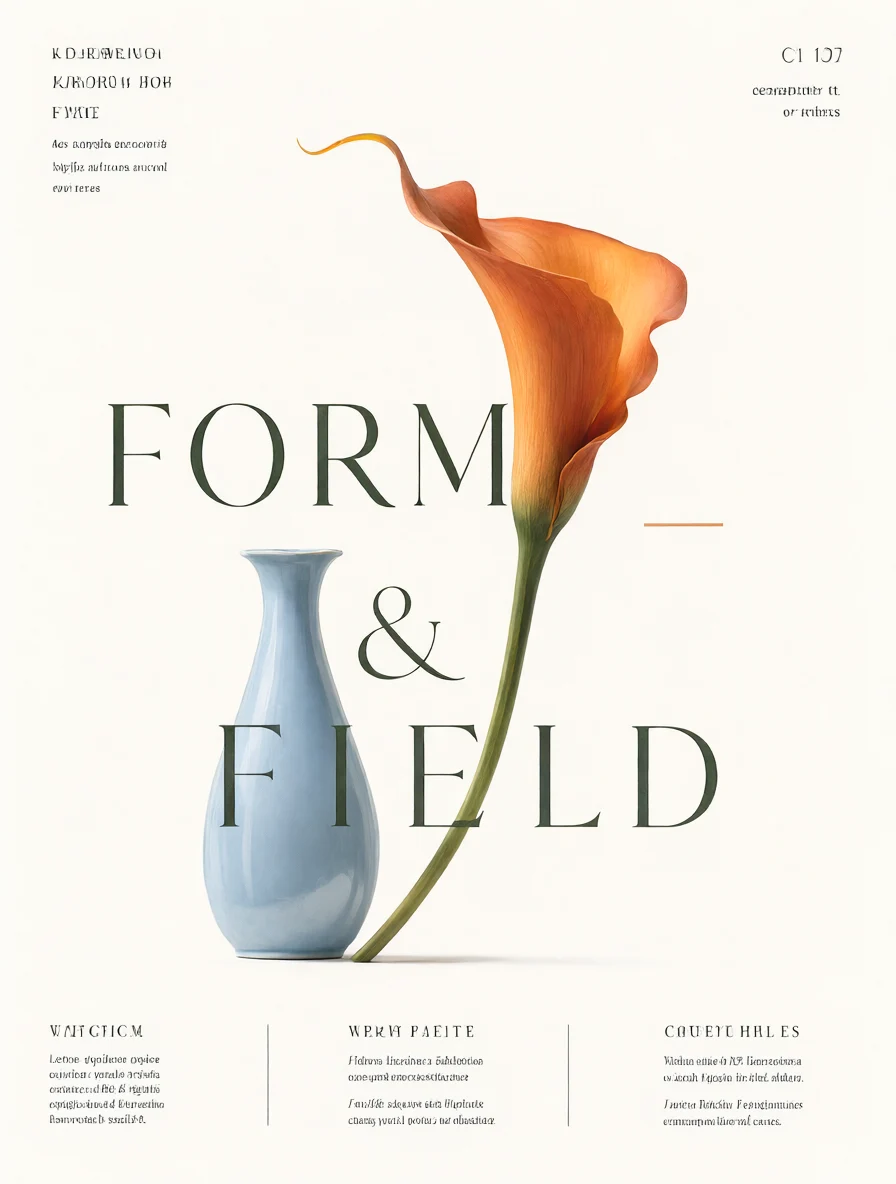
Open the original 896 × 1184 PNG to inspect the lettering. The page preview is compressed.
| Requested | Actual result | Postprocessing needed? |
|---|---|---|
| Large “FORM & FIELD” heading | The words and ampersand are legible, arranged across three lines and overlapping the visual | Check spacing and placement; recreate the text as an editable layer if it must change later |
| No additional wording was supplied | The model added garbled small captions around the edges | Yes: remove or replace these before publication |
| Orange calla lily, pale blue vase and off-white paper | All three appear in the composition | Keep the artwork if it fits your brief; this is an invented visual, not a real product photo |
If the words are wrong, choose a bounded fix
For one wrong word, you can try a focused reference edit, then compare both the lettering and the artwork. Do not assume a successful generation means a successful correction. Our text-repair test includes a Qwen Image 3 Pro edit that left unwanted lettering in place and changed the vase texture. A separate Qwen Image 2.1 attempt removed the text but also changed the subject slightly. Neither is a guarantee for your next image.
For long copy, dates, prices, legal lines or repeated updates, use a design editor:
- Keep or generate artwork with empty space for the text.
- Remove unwanted lettering or request a text-free version, checking any changes to the visual.
- Add the final words as separate text layers. Proofread spelling, punctuation, line breaks and spacing.
- Save the editable project in that editor, then export a finished PNG or other required format.
The workspace does not turn a generated bitmap into editable text layers. If only an object or color needs changing, see reference editing.
Resolution, credits and the next step
Use 1K to explore composition. Choose 2K for a larger file, not as a spelling fix. With Qwen Image 2.1, a 1K draft uses 35 credits; a 2K generation uses 65. One 1K draft plus one 1K reference edit uses 70 credits. Stop and reassess after that edit if the text still fails. See model and resolution costs.
There are no free signup generation credits. One-time packs and optional subscriptions are available; no subscription required. Start with a short heading if you want to explore a composition, or leave the lettering to your editor when exact wording matters.